Thursday, February 16, 2012

Review: Blackberry Playbook part 1


So finally I'm back with another review. I'm really sorry for my absence. I haven't had any gadgets up for reviewing .... until now. This review will be divided into 2 parts.This is because of the new huge update that will released in a few days. So this part will cover OS 1.08 and part 2 will unravel OS 2.0. 

This little fellow is packed with a dual core 1 GHZ processor, 1 GB RAM, 7“ display, 10 hour of battery life, 16, 32 or 64 GB memory and weighs only 400 grams. Sounds interesting? Here are my thoughts:

The Good

The size. Compact, thin and gorgeous. Weighing only 400 grams makes it ultra portable. 

The camera. 5 megapixels cam on a tablet is very good. You also have the capability of filming at 1080p and it looks good. 

The battery life. I've been using it for days now and every single time it has lasted the whole day and then some. 24 hours +. 

The Blackberry OS. It's looks great, works great, feels great.... it's simply wonderful! I love the gesture system that the OS uses. There are no home or back button, instead you use gestures to navigate in the system. 

The things included. You'll get a usb cable, an AC power adapter. a cleaning cloth and a great looking pouch that protects you playbook (see pic below)

The price. I bought the 64 GB version and it costs only $320.99 or 2235 SEK. 

Compatible with flash. You will now experience the interwebs the way it should be experienced. A lot of tablets does not support flash. 

Blue tooth connections. You can connect wireless keyboards and mice to the Blackberry Playbook. 

HDMI port. Yes I know! It's just awesome!

It's fast. Not as fast as an iPad but it certainly comes close. 

The speakers. They are located in front of the device. One on each side and they sound great! 

The Bad

Apps. This is the biggest drawback with the device. The lack of apps in the marketplace. However, the marketplace is growing.

1024x600 display. I think the resolution is too low. With such low res the display can get a bit grainy. 

3G/4G. The Playbook doesn't support 3G/4G. Would've been so cool if you could connect a 3G modem to the Playbook. However, you can connect the device to a phone, for instance an iPhone and use the personal internet hot spot. 

File format supported. No FLAC, MKV or WAV support. Hopefully OS 2.0 will solve this problem. 

No integrated mail and calender. Another huge drawback. Of course you want to sync your Playbook with you gmail account. However, OS 2.0 will change all that. Stay tuned for part 2. 

Conclusion

Despite some huge drawbacks on the Blackberry Playbook I must say the device is incredible. I've been looking for a small and competent tablet for a long time now and I gave the Blackberry Playbook a shot. Clearly it was the right choice. I recommend the Blackberry Playbook to people who wants a smaller device that's easy to bring with you. But don't let the size fool you, the device is very competent and powerful.

Part 2 of this review can be found here >> Review: Blackberry Playbook part 2


Score 8 out 10


Tuesday, February 7, 2012

Coming up on Noyas Gadgets


Hello viewers and sorry for my absence lately. Coming up in a near future here at Noyas Gagets will be a review on the Asus Transformers Prime and the Blackberry Playbook. In a few days I will receive these two devices. Thank you all for your patience and I'm really sorry. There have been shortage on the gadgets department. But rest assured this will change very soon.

Monday, January 30, 2012

Review: Sandisk Sansa Clip Zip


SanDisk has created the ultimate on-the-go music experience. As the newest addition to the acclaimed Sansa Clip product family, the Sansa Clip Zip MP3 Player boasts a bigger screen now with color, expandable memory card slot, added stopwatch, FM radio, and is compatible with the DRM-free iTunes® AAC music format. This feature-rich player is perfect to guide you to the finish or accompany you along your journey. Here are my thoughts:

The Good


The size. The Sansa Sandisk Clip Zip still is very small. It's a tad larger than it's predecessor Clip +. This is because Sandisk have implanted a new screen that's a bit larger. However, the Clip Zip size is still very small and light weight which I love.

The sound quality. Sandisk amazes me once again. How can you make such a small device and sounds so good and loud? It's simply amazing! By now you all know what a volume freak I am. Sandisk delivers well and match my needs very good.

The audio formats. The Sandisk Sansa Clip Zip is AAC Compatible (DRM-free iTunes), MP3, WMA, secure WMA, Ogg Vorbis, and FLAC. This little thing, even supports FLAC!

The Expanded memory slot. You can expand the memory with a 32 GB SDHC card which will get you 40GB or 36GB depending on which device you got. I comes with 4GB or 8GB internal memory.

Drag and drop. In order to transfer music you'll just have to drag and drop the files into your device. No need for any programs. However, Sandisk have included a quite nice program to sync, upgrade, upload album art etc. to your Clip Zip.

The equalizer. There are several pre made equalizers that you can choose from but the most important one is the custom equalizer. Here you can tweak your tracks for the best listening experience.

The Battery life. I think the battery life has improved a few hours compared to the Sansa Clip +. About 15 hour of playback is expected. For such a small device, that's quite impressive. 

The clip. It's made of a sturdy metal spring that will fasten on anything you choose and it wont let go. Much better constructed then the Clip +.

The Price. 4GB version costs $49.99 or 499SEK

The control buttons. They are so much better now then Clip +. Nice clicking feedback and great response.

The Bad

The screen. Sure it's much nicer with some colors on the screen but it looks really really dull. The colors are very faded and looks like an old CRT screen from the early 90's. Ok maybe we shouldn't expect to much considering it's size and price. Clearly Sandisk have put all effort on making the Clip Zip sound better than the screen looks. 

The track info. During the playback of a track you cannot see the info. With the info I mean you want see, on what minute or second you're currently playing. This must be a bug in the firmware and hopefully it will get solved. It's really annoying.

The headphones. Like most of the mp3 players, the phones that always get included in package is quite horrible. No exception with the the Clip Zip. 

Conclusion

I really really enjoy the Sandisk Sansa Clip Zip. It's so easy to bring with you and will always sound very good. The price is also great and if you add a few more dollars you'll expand the memory and viola you got a full mp3 library with you. Using the Clip Zip when training is marvelous. I couldn't think of an device that would do the job better. You wont even feel it because of it's light weight. No brainer ! Just get it.    


Score 8 out of 10


Wednesday, January 25, 2012

The Best of CES 2012

There were a lot of gadgets at the CES convention earlier this month. I have picked out a few that I can't wait to get my hands on.


Razer Project Fiona


The most impressive device that was shown at CES was the Razer Project Fiona. Take a look at this clip down below and you will understand what I mean:


It looks incredible. Look at the graphics!! It's amazing. I certainly hope we will experience this tablet soon. Early prediction tells us that it might get released Q2 2013. Imagine the fun of playing the Fiona head to head with a friend or several friends. Oh my god!! FINISH IT ALREADY!


Playstation Vita

I want to buy it. No ..... there's no point of buying it...... or is there? I couldn't make up my mind until I saw the clip below. 


Look at the graphics. Almost like a portable PS3? I'm getting it. I just hope there will be a gaming market. I bought PSP Go when it was released and I liked it. However, there were no games released on the device and after only 3 months I sold it to a friend. 


Samsung Smart Window

Now this looks very interesting. You need to see the clip to understand.


Oh my god! How cool is this? Incredible. Only question that comes to my mind..... how often will you be standing up in order to surf the interwebs, get weather info, play movie clips etc? Ahhh whatever it's über cool!!! 


Asus Memo 370T


Now this is a tablet that I'm looking for. I want a competent and small tablet with nice specs. Take a look at the clip.


The 370T comes with 1GB of RAM and at least 16GB of storage. It also has a 1280x800-pixel IPS screenRead and a Micro-USB port, a microSD card reader, and a Micro-HDMI port. All this at the price of $250. I want it! I need it!! 

Monday, January 23, 2012

Review: NHL Gamecenter on 4 platforms


Being a huge NHL fan I thought I'd try NHL Gamecenter on 4 different platforms,the D-Link Boxee, PlayStation 3, Apple TV and using it on a computer.


D-Link Boxee


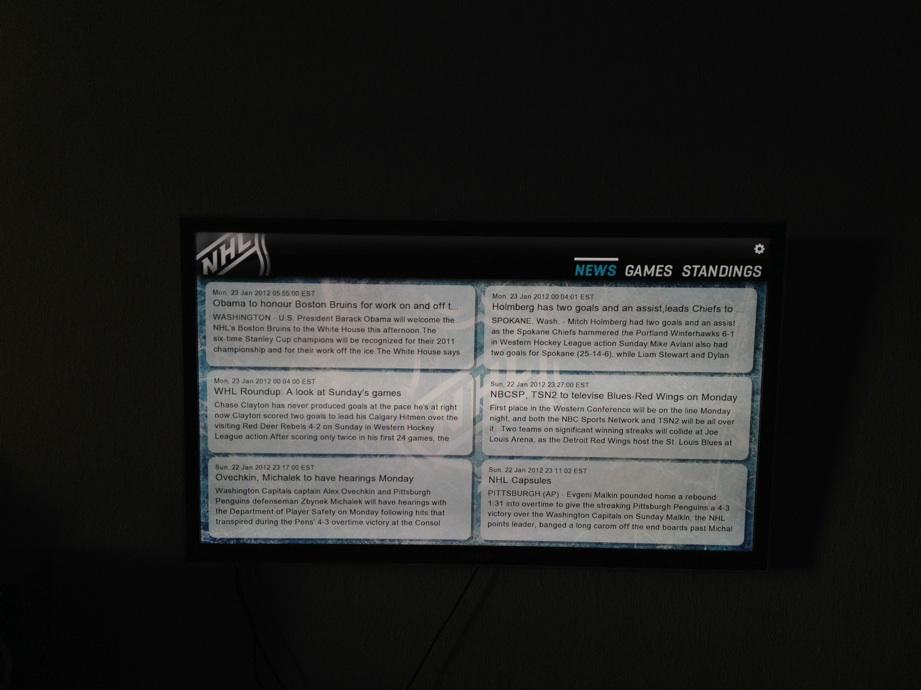
Using Gamecenter on the Boxee is really nice. When you start the app the first screen to appear (see picture below) is the recent news regarding NHL. The Boxee app is the only app that provides you with news which is very cool and will keep you up to date what's going on.


You can then choose to watch an archived game, highlights or a live game. However during the game your only option is to choose home or away commentary. You will not be able to choose highlights during the game, for instance a goal that were produced earlier in the game. However you can rewind and fast forward.


You can access more info like the league standings as you can see on the picture down below.


Conclusion


The Gamecenter Boxee app works great. It's much more stable now then it was before. Earlier this season the streams wouldn't work sometimes. If you got it to work some of the streams were very unstable and lagy. A big plus is the idea of reading some news before I choose to watch a match. Nice and very insightful articles will be provided to you. The only true drawback is that there are no features when watching the games, for instance watching a highlight that happen earlier.

Score 7 out of 10 


PlayStation 3

The PlayStation app is nearly perfect. It's interface looks incredible and very easy to navigate through. The first menu you'll encounter is which games are on tonight. You just have to cycle though them and then choose which one you want to watch. After selecting the game you get to choose home or away commentary. 


Compared to the Boxee you can choose the highlights during the game. Lets say you wanted to see that save Henrik did in the first period just choose the tag on the game menu and press play as seen on the picture below. 


During the game you will also be able to look at the stats which is very nice if you missed it during the intermission. 


Conclusion

NHL gamecenter PS3 app is wonderful. With a gorgeous interface and packed with several kick ass features I think this is on of the best platforms. However, I've had some problems with the streams here as well. During the opening of the season the games very lagy and sometimes I couldn't open them. Perhaps these issues has been resovled. I haven't used Gamecenter on PS3 for a while due to it's lack of mobility. Who wants to carry the PS3 with them? 

Score 8 out of 10


Apple TV

The NHL Gamecenter Apple TV app is the smallest one. The app doesn't contain any special features or news. The interface looks both clean and beautiful. Less is sometimes more. It's very easy to navigate through the menus and you will find what you're looking for immediately.


To be honest I haven't tried the app much but it worked like a charm yesterday when I watched the Boston Flyers game, no lag or instability. The only feature the Apple TV app has is game highlights. You just choose which games to want to relive as seen on the picture below. 


The picture quality on all the platforms depends on your internet speed. It will send the best quality if you have high speed internet connection. It will take a few seconds for Gamecenter servers to determine what speed you will be able to handle and then adjust the quality. The Apple TV app toke only 2-5 seconds and the picture delivered a crisp quality. Compared to the other platforms it toke up to a minute for the picture to adjust. 


Conclusion

The NHL Gamecenter app for Apple TV is very simple. If you are looking for a straight foward no special feature platform for your NHL needs then the Apple TV is the best choice. You'll find everything you need instantly. 

Score 7 out of 10  


Computer

Using NHL Gamecenter on a computer is just incredible. So many features that it will blow your mind. I just love it!! After choosing a game you can choose the quality to be in 400, 800, 1600, 3000 or let the service determine the best quality your system can provide. 


Another extremly cool feature is that you can view 4 games simultaneously in four different windows on you screen. Now this feature will be awesome in the playoff if you want to cover all the action without missing anything.


Ice tracker is a neat little feature that lets you track all the events that happens/happened at the game. Check out all the stats, highlights and much more using this powerful statistical tools. 


Conclusion

NHL Game Center on a computer is clearly the winner. It's packed with so much features and info that you just can't get enough. The only thing from getting a perfect 10 out 10 score is that I've been experiencing some problems with the streams. It sometimes get lagy and if you are using the best quality available option the stream sometimes jumps from low quality to high quality and vice verse which makes the picture and sound all distorted. This of course happens very seldom so I can see past that but...... it won't get a perfect score sadly.

Score 9 out of 10   

Wednesday, January 18, 2012

Review: SpotON Radio


SpotON Radio is an app for iOS that takes the Spotify experience to the next level and will help you discover great new music. SpotON Radio allows you to create personalized radio stations that mixes your Spotify favorites with all new songs.

The Good


Discover new favorite songs. It really works. Just type in your favorite artist/band and SpotON will find similar artist and play songs like a radio station. When I first tried it out I got 2 new tracks that I added to my playlist instantly. You can also export an entire stations history to your Spotify playlists.

The interface. It looks gorgeous. Much better looking than Spotify's own interface,

Sound quality. High quality streaming (320 kbps) when on WiFi.

Airplay. Works well using Airplay. Just double-tap the home button and swiping all the way to the left.

The price. It's free!! For the moment that is.


The Bad


SpotON Radio requires a Spotify Premium account which costs $9.99 per month or 99SEK.

It's unclear what sound quality it has using a 3G network.

Conslusion


SpotON Radio is an effective new way of discovering music. I really recommend this app if you want to widen your library of music. SpotON is really good of finding similar artist of your choice and will definitely add new artists/bands to your playlists.


Score 8 out of 10


Monday, January 16, 2012

Review: PA2V2 Headphone Amplifier


I bought myself an iPod classic 160GB last year so that I could store a huge collection of music and still be portable. The iPod really came through and met my expectation ..... except for one thing..... the volume. The sound quality itself is great, don't get me wrong but I felt that the volume was too low. I started browsing the interwebs for an portable amplifier and found >> Gary at Electric Avenues.


By plugging your headphones into this PA2V2 amp instead of directly into your music player, you will help them to reach their full potential. Not only does it make the music louder, but more importantly the amp creates deeper, more powerful bass and clearer high frequencies at all volume levels but would it increase the volume on my iPod? Here are my thoughts:

The Good


The Sound. It actually works. The volume actually got louder and the sound quality got a boost as well. I got really surprised.

The battery life. The PA2V2 Headphone Amplifier runs with 2 AA batteries and will fully charged run for 100 hours!!! How about that?

AC Adapter included. Along with the Amp you will receive an AC adapter for recharging the batteries or if you just want to run the amp at home though the socket.

Audio cable included. You will also receive an Audio cable which you'll need to connect to your device.

The size. It's pretty small and you'll have no problem bringing it with you.

The price. Only $56 or 410SEK and free worldwide shipping!!!

The Bad


Nothing much to say here other than being a high volume freak, I would have asked for a bit more volume.

Conclusion


If you're looking to boost your music devices then the PA2V2 Headphone Amplifier is your answer. With a low price and long lasting battery life it's a no brainer, you simply need to buy it. Gary at  Electric Avenues is incredibly kind and helpful. I didn't recieve my first copy I ordered (probably got lost somewhere in the world through the mail) so Gary send me a new one and arrived a few days later. Now that's what we call a guy who's service minded.

Score 9 out of 10

Sunday, January 15, 2012

Sweboxee.se - Boxee site


Ever since I got my Boxee I've been browsing the interwebs for a good site with info regarding the device. I found Sweboxee. It's a great site with relevant info and keeps me updated with the latest on the Boxee. From time to time they arrange various competition. For instance those who entered the latest competition had the chance to win a 2 movies at Headweb. So to all my Swedish viewers head over to Sweboxee to stay updated with the latest on the Boxee.

>> www.sweboxee.se

Friday, January 13, 2012

Review: FL Studio 10 Producer Edition


First of all I want to thank Image-Line for giving me the opportunity to review their great software.  

FL Studio is one of the world's most popular and exciting music production systems. Everything you need in one package to compose, arrange, record, edit, mix and master professional quality music.

Image-Line have developed FL Studio for over 12 years now. Compatibility, connectivity and open standards are the life-blood of producer/musicians. FL Studio will play any sample file (WAV), run plugins (software synthesizers, VSTi & DXi) or MIDI instruments. You will be creating WAV, MP3, OGG or MIDI songs,  beats or loops only minutes after launching it.

Below at the end of this review you will find a clip of a track I started making during this review.


The Good

The interface. I really like the interface. Compared to other music softwares, FL Studio is very unique. Nice dark colours which is nice to lay your eyes on. You can also change diffrent skins if you get tired of the default skin.


Learn fast. It's pretty easy getting started. There are some great documentations implanted in the software which will help you start making a track.

Plugins and file format support. As mentioned above FL studio supports a lot of different plugins like VSTi & DXi. After you're done with your track you will be able to save it in many different format for instance mp3. This is very nice. You wont have to use a third party application in order to convert to desired format.

Easy installing. If you want to use hardware like a keyboard or a external soundcard it's really easy to set these up. Just have to select them in setting and which driver the software should use then you're good to go.

Implanted tools. FL studio comes with different effects and tools. Flanger, Delay, EQ and much more which will help you master and mix your track. I think the work very good.

Life time upgrades. You only buy FL Studio once then all future program updates are FREE for LIFE! This means that you're guaranteed to receive FL Studio 11 and all other future versions absolutely free.

The price. FL Studio Producer Edition cost $199 download version and $299 boxed version.

Working with VSTi plugins. I tried some demo version of various VSTi plugins. Mainly softsynths and everyone worked perfectly and stable. I never had any problems with lag or crashes.

The Bad

There isn't much to say here. Maybe some more plugins could be included in the producer edition. It's a bit thin when you get started.

Conclusion

I have tried several music softwares throughout the years. Cubase, Reason, Ableton and more. I think FL Studio is without doubt in my mind the best software for music making. The interface makes it easier to get into things compared to other softwares. Using VSTi plugins in FL Studio works perfectly without any hiccups. I really recommend FL Studio for those people who's thinking of  starting a music career. Easy to learn and once you get a hang of things you will stick with FL Studio........ period!


Score 9 out of 10


Sample of a track I started making with this review:

Celestial - Untitled by Celestial303

Monday, January 9, 2012

What to Look Forward to in 2012


2012 is here and hopefully this year will be filled with many new gadgets, games, phones etc. Down below is a small list of some of the highlights we'll be seeing soon.

Gaming


Xbox 720.

Will we be seeing a new Xbox console this year? Latest rumors says that a new Microsoft console will be released Q3 or Q4 this year and that the device will be presented at the E3 Expo this summer. Considering that Nintendo has made available an official statement related to their appearance at the CES 2012, in which they confirm that console launch date will take place sometime “between the start of the 2012 E3 Expo in June, and the end of 2012.” this will put pressure on Microsoft of releasing the console as quick as possible so that Nintendo doesn't sell humongous amount of consoles before Xbox even gets released.

PS4


Sony have not officially given us an release date of the PS4 but all the rumors points to late 2012. If this is correct we might see 3 consoles rolling out almost at the same time. Oh my god what a battle! This years E3 Expo might be the most important Expo ever for us gamers.

Mass Effect 3


Only a few months left to it's release. Write down March 6th 2012 to your calender. This will be the day you can pick up you copy and once again enjoy one of the best RPG Action game series ever made. Here's a sample of the gameplay in Mass Effect 3:


Diablo 3

Latest rumors tells us that late February Diablo will be released. However, we all know how Blizzard can be. Delays, delays and more delays. Delayizzard told us that it was suppose to be released Q4 2011 until something once again went wrong. The runestone system needed to be adjusted as well as some other tweaks. We can't wait much longer!! Come on! We have been waiting almost 12 years for a new Diablo. Here's a gameplay video of Diablo 3:


Max Payne 3

Max Payne is back! This time Rockstar (makers of the GTA Series) has developed the game. Judging from the video clip below Max Payne is going to be success yet again. The game is to be released in March 2012. Here's the clip:


Gadgets

iPad 3

The hottest gossip regarding iPad 3 is that it'll be presented February 24th 2012. Why? Steve Jobs may he rest in peace, was born on the 24th. Further more maybe we'll see a Quad core A6 processor inserted. Now that's a lot of power. However, this is just speculation based on some figures receding in the iOS 5 code. Whatever happens I'm certain that the new iPad will be a great success.

Apple TV 3rd Generation

Hopefully a new Apple TV will be presented soon. Condisering that Apple is dropping the price on the Apple TV 2nd Gen a 3rd Gen must be on it's way. You don't have to be a rocket scientist to guess that the device most likely will get an A5 processor and will support 1080p playback. 

Dell Peju Windows 8 Tablet 

This tablet can really get interesting if it meets the expectation and rumors. How does this sound: A Core i5 processor, 1080p display resolution, 5,500 mAh battery, 4GB of RAM, front 1.3 megapixel and rear 5 megapixel cameras, and 64GB or 120GB drives and with the new OS Windows 8